
İTEMPOL Oyun Haberleri ve Rehberleri
Metin2, Mobile2, Royale2 Online ve diğer popüler oyunlara ait güncel rehberleri, server tanıtımlarını ve dijital ürün içeriklerini keşfedin.
News Category » Gaming News » What to Do After Buying a Game Account? 2026 Security Guide
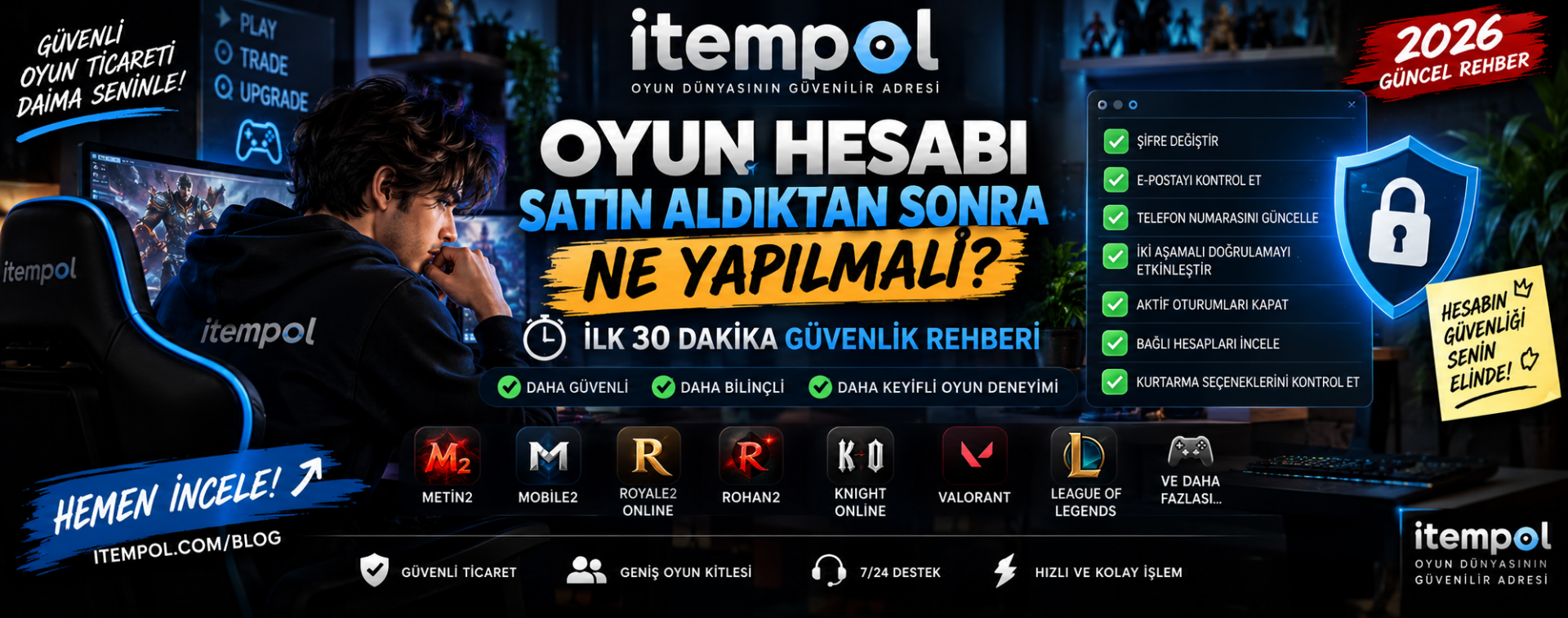
WHAT TO DO AFTER BUYING A GAME ACCOUNT? 2026 SECURITY GUIDE
Buying a game account can be an attractive option for players who want to skip long progression periods and start with an already-developed character, valuable items, rare cosmetics or established in-game progress.
However, completing the payment and receiving the username and password does not necessarily mean that the account transfer process is finished.
One of the most important stages begins immediately after you receive access to the account.
Changing only the password may not be enough. Depending on the game or platform, the account may still contain an old recovery email address, phone number, connected social account, active device session or another recovery method.
In this guide, we explain what to do after buying a game account and which security settings you should check during the first 30 minutes.
The information can be useful for players buying accounts for games such as Metin2, Mobile2, Royale2 Online, Rohan2, Knight Online, Valorant, League of Legends and many other online games.
## Why Should You Secure a Game Account Immediately?
Receiving the login credentials does not automatically mean that every security option has been transferred to you.
The previous owner may still have information connected to the account, including:
- Recovery email
- Phone number
- Two-factor authentication
- Backup or recovery codes
- Connected social accounts
- Previously authorized devices
- Active login sessions
For this reason, you should review all available security settings as soon as the account has been delivered.
## First 5 Minutes: Check the Account and Delivery
Before making major changes, log in and verify that the account matches the listing or description you purchased.
Depending on the game, check:
- Character level
- Equipment
- Rare items
- Costumes and skins
- Pets and mounts
- In-game currency
- Inventory
- Storage
- Premium content
- Character progression
If the delivered account is significantly different from what was advertised, consider reporting the issue through the marketplace or service used for the transaction before making extensive changes.
## 5-10 Minutes: Change the Game Account Password
If everything matches the listing, changing the password should be one of your first security steps.
Create a password that you have not previously used on another website or game.
A strong password can include uppercase and lowercase letters, numbers and supported special characters.
Avoid using the same password for your game account, email account and other online services.
Using unique passwords reduces the potential impact if one service is compromised.
## 10-15 Minutes: Check the Email Address
Next, check which email address is connected to the game account.
If the game allows email changes, consider connecting the account to an email address that only you can access.
Do not focus only on the email address displayed in the account settings.
You should also check whether additional recovery options remain associated with the previous owner.
## Check the Connected Phone Number
Many online games and gaming platforms use phone verification as an additional security measure.
If the account contains the previous owner's phone number and the service allows it to be changed, update it with your own information.
After making the change, verify that the new phone number has been successfully confirmed.
## Enable Two-Factor Authentication
If the game or platform supports two-factor authentication, enabling it can provide an additional layer of security.
Two-factor authentication may require a second verification method when someone attempts to log in.
Depending on the platform, this may involve:
- An authenticator application
- Email verification
- SMS verification
- Security keys
- Backup codes
Store any recovery codes securely and do not share them with other people.
## Log Out Other Devices and Active Sessions
This step is frequently overlooked when players buy game accounts.
On some platforms, changing the password may not automatically terminate every previously authorized session.
Look for settings such as:
- Active Sessions
- Devices
- Login Activity
- Authorized Devices
- Sign Out of All Devices
- Log Out Other Sessions
If available, terminate sessions that you do not recognize and log back in using your own device.
## Check Connected Accounts
Modern gaming accounts may be linked to third-party services.
These can include Google, Apple, Facebook, Steam, Discord or other gaming platforms.
Review the account's connected services and remove unfamiliar connections when the platform allows you to do so.
A forgotten third-party connection can potentially create an additional route into the account.
## Review Account Recovery Options
Account recovery is one of the most important areas to examine after buying a game account.
Even if the current password has been changed, some services may allow account recovery using previously registered information.
Recovery procedures vary significantly between games.
Depending on the platform, recovery may involve:
- Original email information
- Phone verification
- Account creation details
- Previous passwords
- Purchase information
- Recovery codes
- Other ownership information
Because these procedures differ, buyers should never assume that changing the password alone eliminates every account recovery risk.
## Can the Previous Owner Recover a Sold Game Account?
This is one of the most common questions among players considering buying a game account.
There is no universal answer.
Account recovery procedures depend on the game, publisher and account system.
Some services may consider historical ownership information when reviewing recovery requests.
For this reason, buyers should understand that changing the email address and password does not necessarily guarantee that a transferred account can never be recovered through another method.
## Is Buying and Selling Game Accounts Allowed?
The answer depends on the individual game or service.
Some game publishers prohibit account sales, transfers or sharing under their terms of service, while other games or private servers may have different policies.
Players should therefore review the current terms and account-transfer rules of the specific game before buying or selling an account.
A marketplace listing does not override the rules established by the game's publisher or server operator.
## Why Use a Game Account Marketplace?
Game accounts are frequently advertised through social media, forums, Discord communities and messaging applications.
Direct transactions with unknown individuals may involve additional risks because there may be fewer mechanisms for documenting the transaction or resolving a dispute.
A structured marketplace can provide a clearer process for listings, payments, delivery and communication between buyers and sellers.
Players browsing account listings on Itempol should still carefully examine the listing details, account information and applicable game rules before completing a transaction.
## What Determines the Value of a Game Account?
Character level is only one factor affecting the value of an account.
Depending on the game, account value may be influenced by:
- Character level
- Equipment quality
- Rare items
- Limited costumes or skins
- Pets
- Mounts
- In-game currency
- Server popularity
- Account age
- PvP progression
- PvM progression
- Completed missions
- Guild status
- Limited-time content
- Collectibles
The importance of each factor varies from game to game.
For this reason, two accounts at the same level can have significantly different market values.
## What to Check After Buying a Metin2 Account
Metin2 account value can depend on much more than character level.
Depending on the server and account, players may consider equipment, Alchemy progress, Biologist missions, pets, costumes, belts and other character progression.
After receiving a Metin2 account, compare the delivered character and items with the original listing and review every available account security option.
## What to Check After Buying a Mobile2 Account
Mobile2 server systems can vary considerably.
Progression, items, currencies, account security and trading rules on one Mobile2 server should not automatically be assumed to apply to another server.
Before buying a Mobile2 account, check the specific server's current rules and account systems.
After delivery, verify the character, items and other assets included in the listing.
## Royale2 Online and Rohan2 Accounts
The value of Royale2 Online and Rohan2 accounts can also depend on character development, equipment, server activity and the in-game economy.
Buyers should verify that the account contains the advertised assets and review the security options available for that particular game or server.
## Valorant and League of Legends Accounts
Valorant and League of Legends use Riot account systems.
Players considering transferred accounts should pay particular attention to email, verification and recovery settings.
It is also important to check Riot Games' current account rules and terms because account transfer policies may change over time.
## Common Mistakes After Buying a Game Account
One of the biggest mistakes is assuming that the account is completely secure immediately after changing its password.
Other common mistakes include:
- Not checking the recovery email
- Ignoring connected phone numbers
- Leaving old sessions active
- Forgetting third-party account connections
- Not verifying the delivered items
- Reusing an existing password
- Ignoring the game's account trading rules
A complete security review is more effective than changing a single setting.
## Game Account Security Checklist
After receiving a purchased game account, use the following checklist:
1. Log in to the account.
2. Verify that the account matches the listing.
3. Check the character and inventory.
4. Change the password.
5. Review the connected email address.
6. Check the phone number.
7. Enable two-factor authentication when available.
8. Sign out of other active sessions.
9. Review authorized devices.
10. Check third-party account connections.
11. Review recovery methods.
12. Verify the account again after making security changes.
## Frequently Asked Questions
### What should I do first after buying a game account?
First, verify that the delivered account matches the original listing. After confirming the contents, review the password, email address, phone number, active sessions, connected accounts and recovery settings.
### Is changing the password enough?
Not necessarily.
Depending on the game, the account may have connected email addresses, phone numbers, active sessions, recovery methods or third-party services that should also be reviewed.
### Is it safe to buy a game account?
The level of risk depends on the game, account, seller, transaction method and applicable account-transfer rules.
Buyers should carefully review both the account and the specific game's policies before completing a transaction.
### Can a seller recover a game account after selling it?
Recovery systems vary between games and platforms. Some account recovery processes may consider historical ownership information, so buyers should not assume that changing the current password automatically removes every recovery possibility.
### Is selling a game account allowed?
It depends on the game or service. Some publishers restrict or prohibit account sales and transfers in their terms of service. Always check the current rules for the specific game.
### What makes a game account valuable?
Account value may depend on character level, rare items, equipment, skins, currencies, progression, server popularity and other game-specific factors.
### Where can I find game accounts?
Gaming marketplaces such as Itempol can contain account listings for different online games. Available games, categories and listings can change over time.
## Conclusion
Buying a game account does not end when you receive the username and password.
The first minutes after delivery are important for verifying the account and reviewing its security settings.
Password, email, phone number, two-factor authentication, active sessions, connected accounts and recovery options should be considered together rather than individually.
Players should also check the current account-transfer policies of the relevant game because trading rules and recovery systems vary between publishers and servers.
By carefully reviewing the account before and after delivery, buyers can better understand the risks involved and manage their newly acquired gaming account more securely.
- E. History : 17.09.2026 20:09
- reading : 8.567
Popular News




İTEMPOL Haberler Bölümünde Neler Bulabilirsiniz?
İTEMPOL Haberler bölümünde oyun dünyasına yönelik bilgilendirici makaleler, oyun rehberleri, server incelemeleri ve dijital ürün içerikleri yayımlanır. Haber başlıklarını ve etiketlerini kullanarak ilgilendiğiniz oyuna ait içeriklere kolayca ulaşabilirsiniz.